For Australian Home Care & Support at Home Package Managers, Care Coordinators, and Administration Teams
Transform Client Intake: Streamline Aged Care Requests with Chuffty Assistance
Replace unclear phone messages and fragmented emails with structured, Draft Code-aligned requests - without disrupting clinical workflows or forcing complex CRM integrations.
Every home care provider knows the administrative burden of handling ad-hoc client requests. Unclear phone messages, fragmented emails, missing client identifiers, and repeated follow-up calls consume valuable administrative hours and delay service delivery.
Chuffty Assistance bridges the communication gap between older Australians and their service providers. By replacing informal, incomplete notes with structured, standard-compliant requests, Chuffty turns client-led requests into clean, actionable data - without disrupting your clinical workflows or forcing complex CRM integrations.
What is Chuffty Assistance?
Assistance is a dedicated feature within the Chuffty senior wellness app. It empowers clients, family carers, and support networks to prepare and send clear, structured service requests directly to their designated home care provider.
Whether a participant needs additional domestic cleaning, non-emergency transport, a nursing check-in, or home safety modifications, Assistance guides them through a step-by-step workflow.
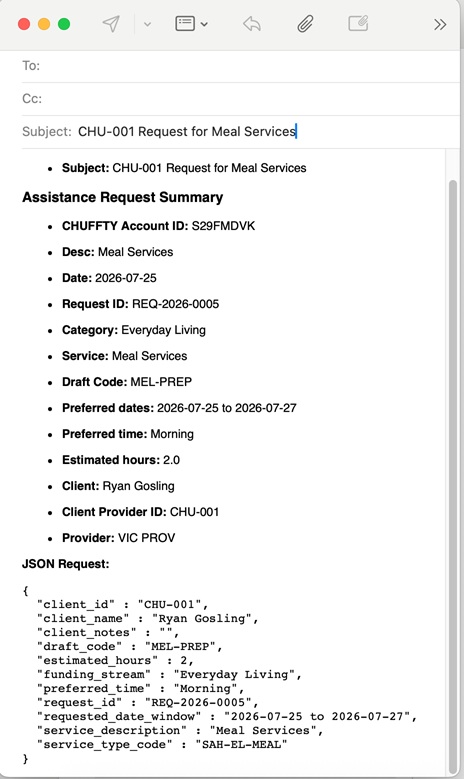
When sent, the provider receives a dual-format email containing:
- A plain-language human summary: Enables intake staff to instantly understand the need.
- A structured JSON payload: Allows seamless copy/paste into CRM, intake tools, or clinical systems, complete with client identification and system draft codes.
Provider information (organization name, contact person, intake email, client name, and Client Provider ID) is saved once during setup, ensuring every request reaches the right team every time.
How Clients Experience Assistance
The intuitive design minimizes friction for older adults while ensuring data integrity for care teams.
[ Setup Once ] → [ 4-Step Guided Wizard ] → [ Draft & Review ] → [ Locked Email Sent ] → [ Track & Solve ]
1. One-Time Setup
In Settings -> Provider Assistance, the client or family member enters their provider's contact email and their unique Client Provider ID. Chuffty flags missing details before a request is attempted.
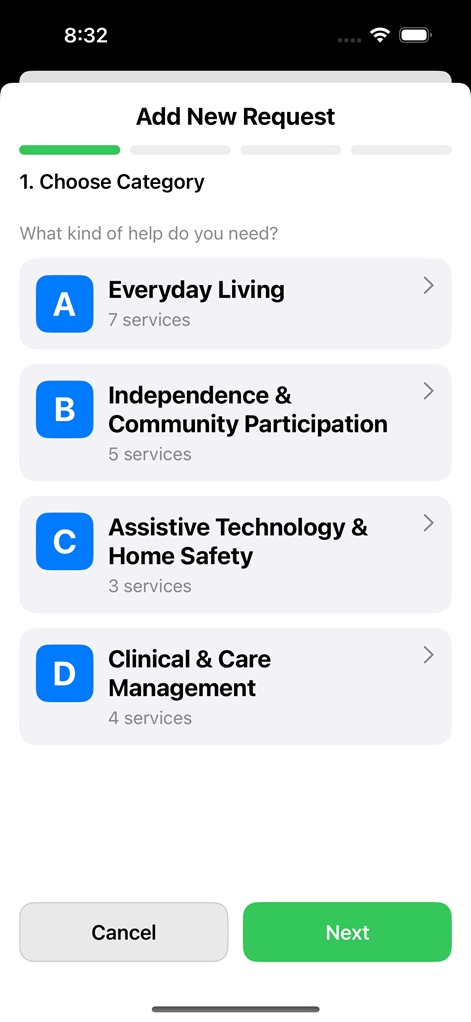
2. Guided 4-Step Wizard
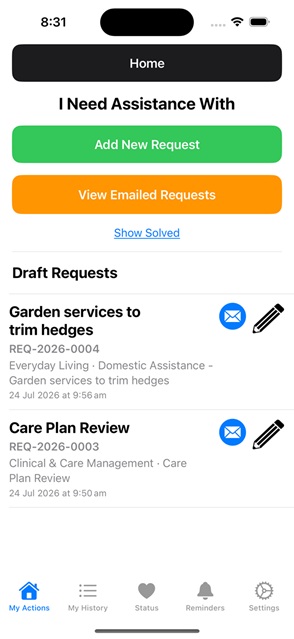
Navigating to My Actions -> Assistance, the client taps Add New Request:
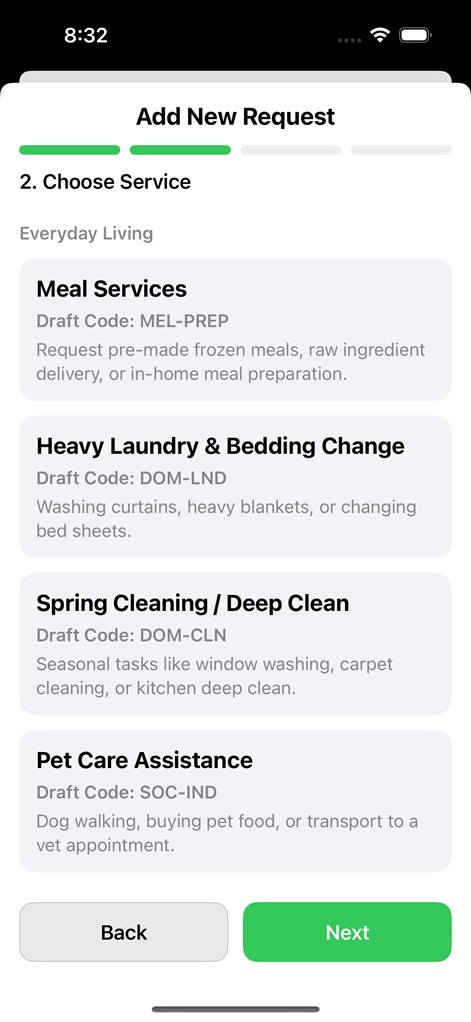
- Step 1: Category Selection - Choose from Everyday Living, Independence & Community, Assistive Technology & Home Safety, or Clinical & Care Management.
- Step 2: Service Selection - Select specific services mapped directly to standard Draft Codes (e.g.,
DOM-CLN,TRN-DIR,NUR-ASM). - Step 3: Details & Preferences - Input short descriptions, preferred date windows, preferred time of day, estimated hours, and special instructions.
- Step 4: Review & Save - Confirm all details and store as a draft.
3. One-Tap Submission & Tracking
When ready, the client taps Email. Chuffty opens their device's native email app pre-populated with the summary and JSON payload.
Once emailed:
- The request status updates and moves to View Emailed Requests.
- The request is locked against further editing to maintain a reliable record of truth for both parties.
- Once fulfilled, the client marks it Solved (with an optional resolution note, e.g., "Completed Tuesday morning"), creating an accessible history of asked, sent, and completed services.
What Care Managers & Admin Teams Receive
Instead of unstructured text, intake staff receive a standardized document:
| Component | Information Provided | Provider Benefit |
|---|---|---|
| Client Identifiers | Full Name & Client Provider ID | Instant matching to participant files in CRM/ERP. |
| Request Reference | Unique Request ID (e.g., REQ-2026-0042) |
Shared tracking code for all verbal and written communication. |
| Funding Stream | Main Category | Directs triage to Domestic, Community, or Clinical teams. |
| Service Classification | Service Name + Draft Code | Direct alignment with your service catalogue and package billing. |
| Scheduling Windows | Preferred Date Range & Time of Day | Roster planners can book immediately without clarifying calls. |
| Resource Estimates | Estimated Hours | Informs capacity planning and worker allocation. |
| Instructions | Client Notes | Captures access needs, preferences, or urgent considerations. |
| Structured Data | Machine-Readable JSON Block | Zero manual re-typing; ready for system intake. |
Example Summary Received:
"Margaret Smith (ID: HC-98231) requests Domestic Assistance (DOM-CLN) - Deep clean kitchen - Preferred: 1-3 Aug, Morning (~2 hours). Request ID: REQ-2026-0042."
Administrative & Operational Alignment
Designed to support Australian home care package management and Support at Home operational frameworks:
- Streamlined Intake & Triage: Requests arrive pre-categorized. Administrative staff route requests based on Draft Codes straight to the appropriate roster queue or care coordinator.
- Roster & Capacity Efficiency: Capturing target dates, times of day, and estimated hours up-front reduces back-and-forth communication between schedulers and participants.
- Support at Home Language Alignment: Categorization reflects contemporary funding streams (Everyday Living, Independence & Community, Assistive Technology, Clinical Care), helping care managers allocate package budgets accurately.
- Audit Trails: The unique
Request IDcreates an auditable reference point across phone calls, emails, and care plan reviews.
Operational Time Savings
| Operational Challenge | Traditional Manual Workflow | With Chuffty Assistance |
|---|---|---|
| Client Identification | Unclear caller names or missing account numbers require file searches. | Every request carries the client's verified name and Provider ID. |
| Requirement Gathering | Vague messages ("I need help next week") require clarification calls. | Specific dates, times, estimated hours, and service codes are included. |
| Service Matching | Staff translate narrative descriptions into billable service lines. | Standardized Draft Codes (e.g., NUR-ASM) identify service requirements instantly. |
| Data Entry | Manual keying of email text into care management systems. | Copy and paste structured JSON directly into internal tools. |
| Follow-Up Volume | High volume of "Did you receive my request?" status checks. | Clear status tracking (Draft, Emailed, Solved) gives clients visibility. |
Roles and Operational Boundaries
Chuffty Assistance is an intake and communication enhancement tool - designed to work alongside existing clinical systems and duty-of-care obligations:
| Role | Responsibility |
|---|---|
| Client / Family Carer | Configures provider settings, creates requests, submits via email, and marks solved. |
| Intake / Admin Team | Receives structured email, matches Client ID, logs request in CRM using Request ID. |
| Scheduler / Coordinator | Uses captured timing and duration preferences to assign support staff. |
| Care Manager | Reviews clinical/equipment requests against care plans and package budgets. |
What Assistance Does Not Do
- Does not auto-book: It does not directly push bookings into provider rostering software without admin review.
- Does not replace assessment: Clinical approvals, risk assessments, and funding eligibility remain under the provider's management.
- Does not bypass client dispatch: Preparing a draft does not send an email until the participant confirms submission in their email client.
Staff & Client Onboarding Talking Points
Introducing Assistance to Package Clients
"When you need extra support or want to request a change, open the Chuffty app and tap Assistance. Choose the help you need, let us know your preferred days and times, and email it to us. It automatically includes your client ID and a unique Request Number, so our care team can action your request faster with fewer follow-up calls."
Briefing Intake & Operations Teams
"Treat incoming Chuffty Assistance emails as pre-formatted intake tickets. Use the Client Provider ID for file matching, the Draft Code to identify the service type, and reference the Request ID in all follow-up communications. You can also copy the included JSON block directly into our intake records."
Summary
Chuffty Assistance simplifies communication for both participants and package managers. By standardizing client requests into structured, code-aligned emails with machine-readable data, providers can reduce administrative overhead, accelerate triage, and deliver responsive, client-centered care.
Related: More aging at home articles | Apps for Home Care Service Providers | Support at Home Workforce | For Clinicians & Partners